 English
 Polish
 Français

Module described in this documentation:AI Content Marking — EU AI Act art. 50 — view in the store →
Module Description
The AI Content Marking module lets you label product images generated or modified by artificial intelligence, in line with article 50 of the EU AI Act applicable from 2 August 2026. Customers see a clear label on product lists and on the image gallery, and machine-readable IPTC/XMP metadata is embedded in the JPEG files.
What the module does
The module combines a customer-visible disclosure with machine-readable marking. You mark images individually (product image grid), per whole product, or in bulk by category. The catalog scanner detects AI traces in existing files (XMP DigitalSourceType, C2PA manifests, generator signatures such as Midjourney, DALL-E or Adobe Firefly) and queues hits for review — nothing shows in the store without your confirmation. A compliance registry with CSV export documents who marked what and when. Every hit shows the basis of the detection (XMP metadata, C2PA credentials or a generator signature), and you confirm or dismiss it right in the list. Removing a mark also strips the XMP marker from the files, so the photo stops declaring AI origin both in your store and outside it.
Key Features
- AI label on product list miniatures (native theme flags)
- Overlay badge on the product image gallery (style, position and text per language)
- Disclosure line on the product page
- IPTC/XMP DigitalSourceType metadata in JPEG files + schema.org JSON-LD
- Catalog scanner with a review queue (XMP, C2PA, generator signatures)
- Every scanner hit shows what triggered the detection
- Separate labels for AI-generated and AI-modified photos
- Custom label colours, or inherit the theme's own flag styling
- Confirm or dismiss hits directly in the registry
- Removing a mark also strips the XMP metadata from the files
- Marking single images, whole products and bulk by category
- Compliance registry with statistics and CSV export
- Multistore, PrestaShop 1.7.5 - 9.x
Requirements
| PrestaShop | 1.7.5 - 9.x |
| PHP | 7.1+ |
| SSL | Recommended (HTTPS) |
Installation
- Download the module ZIP file from presta4you.com store
- Log in to PrestaShop administration panel
- Go to Modules > Module Manager
- Click 'Upload a module' and select the downloaded ZIP file
- After installation click 'Configure' to set up the module
Configuration
After installing the module, go to its configuration. Below are screenshots of the configuration panel with descriptions of each tab:
Config
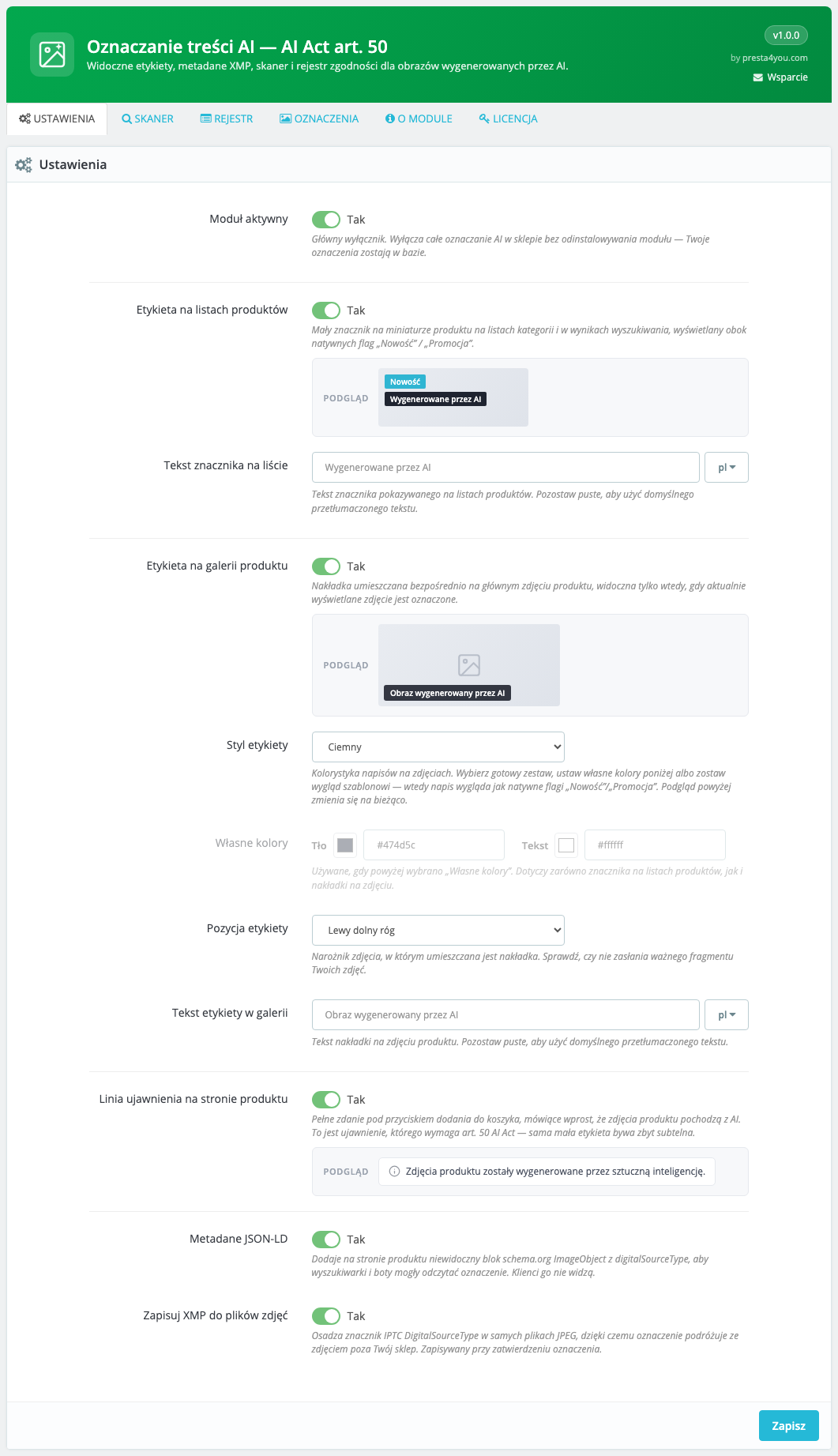
Configuration panel. Enable the marking layers (list label, gallery badge, disclosure line), pick the badge style, colours and position, custom texts per language, and JSON-LD/XMP metadata writing. Every setting has a live preview of what the customer will see.
Store View
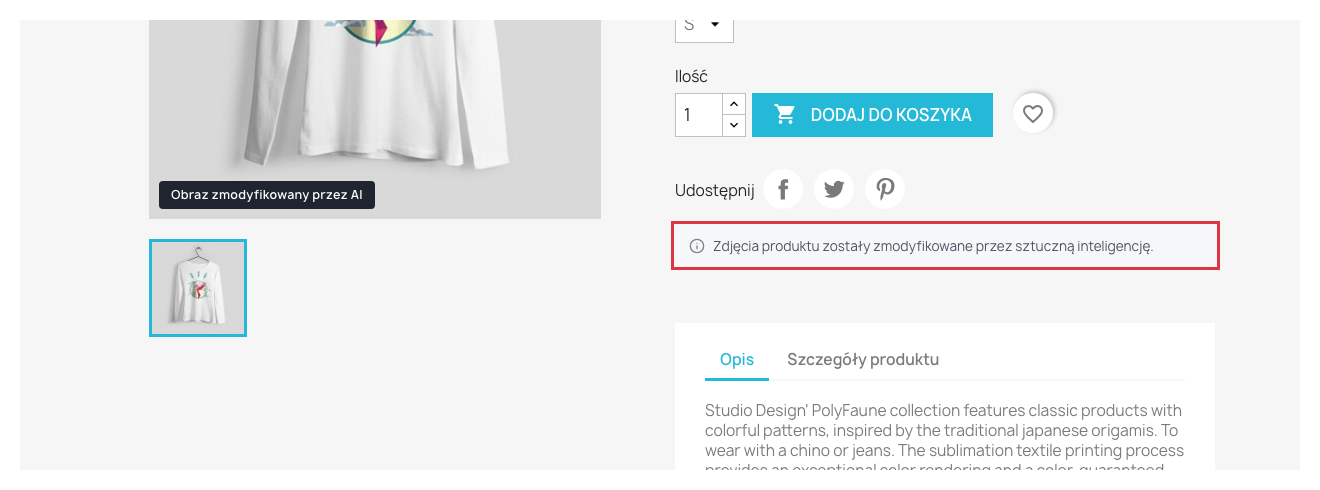
Disclosure line under the purchase area on the product page.
Store View
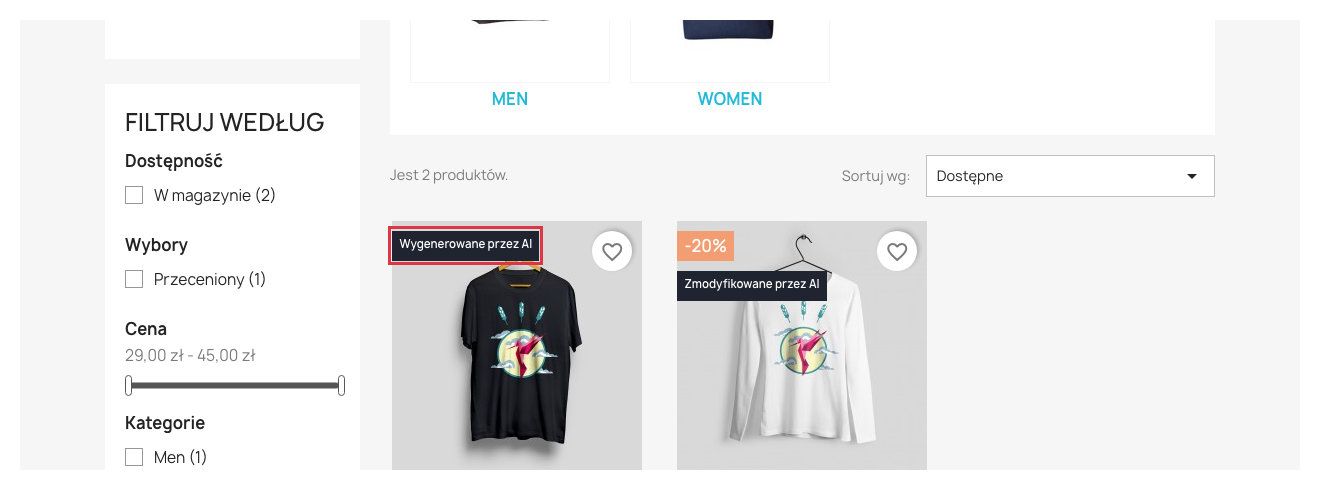
AI label on a product miniature in the category list — next to native New/Sale flags.
Store View
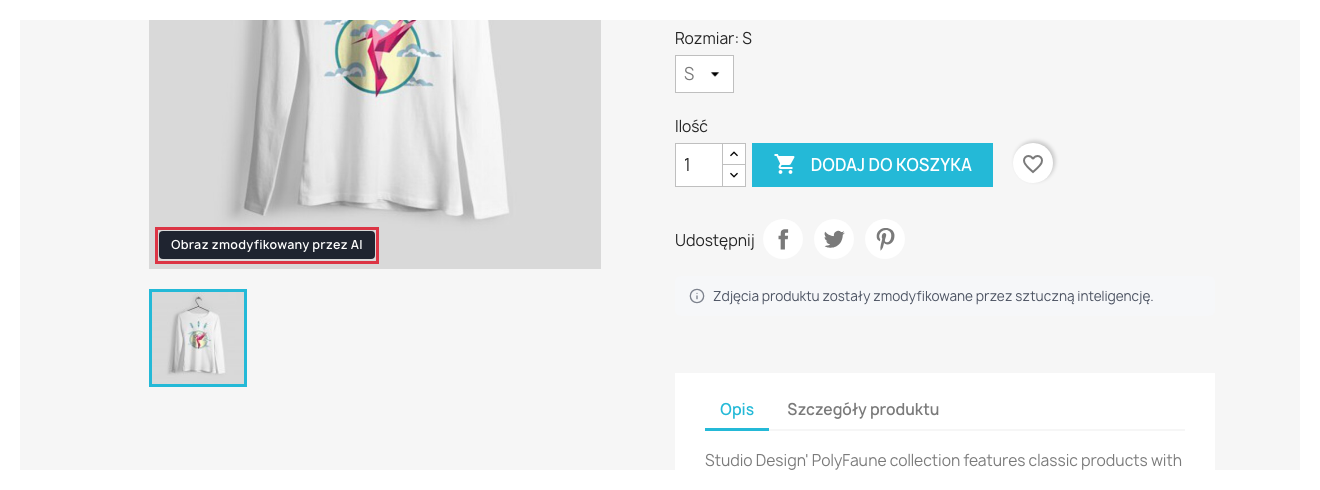
Overlay badge on an AI-generated product image. Text, style and corner are configurable.
Marks
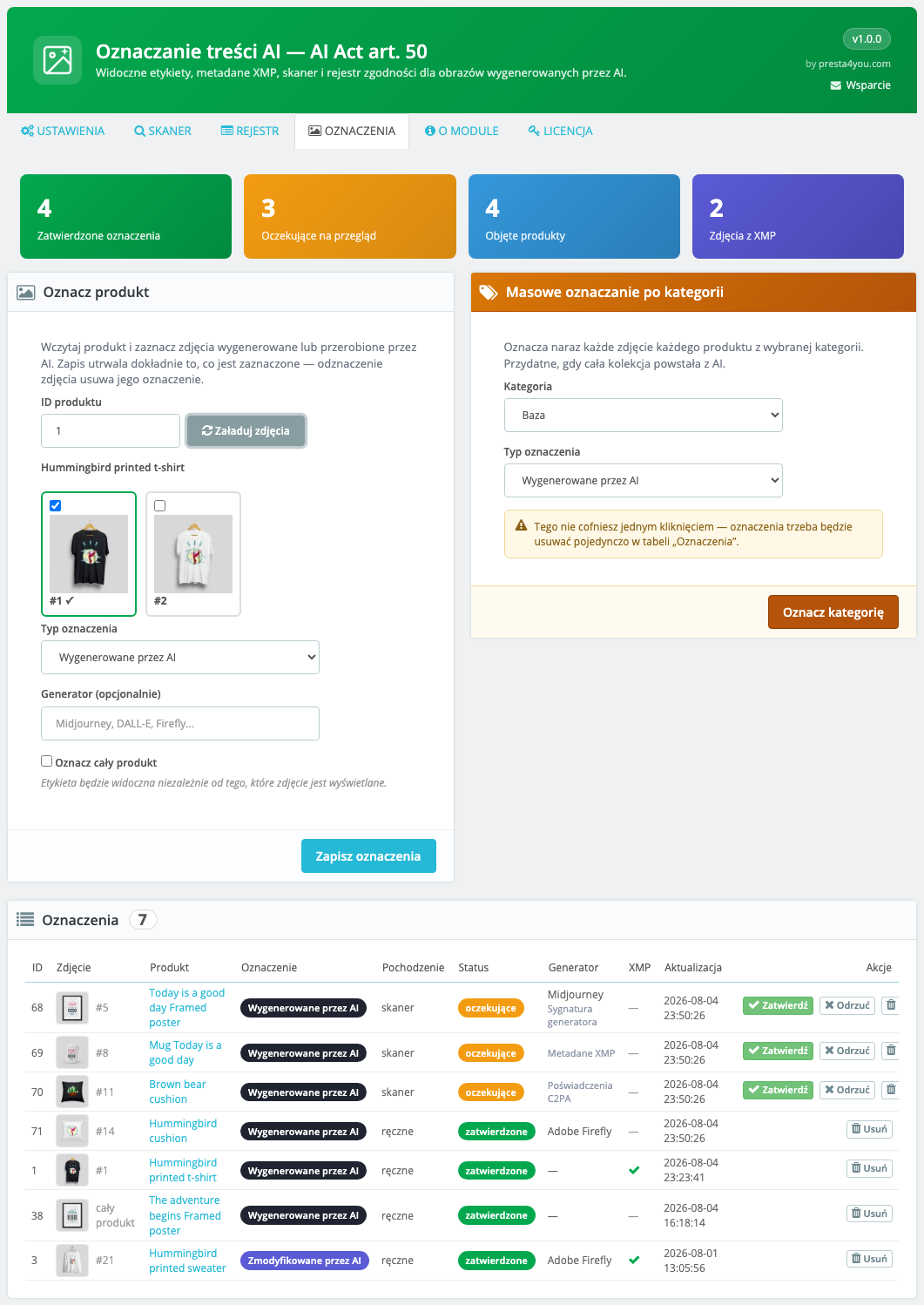
Marks management. Load a product image grid and tick the AI-generated photos, mark a whole product, or a whole category in bulk. Saving stores exactly what is ticked — un-ticking a photo removes its mark. Below, the full marks list with confirm, dismiss and delete actions.
Registry
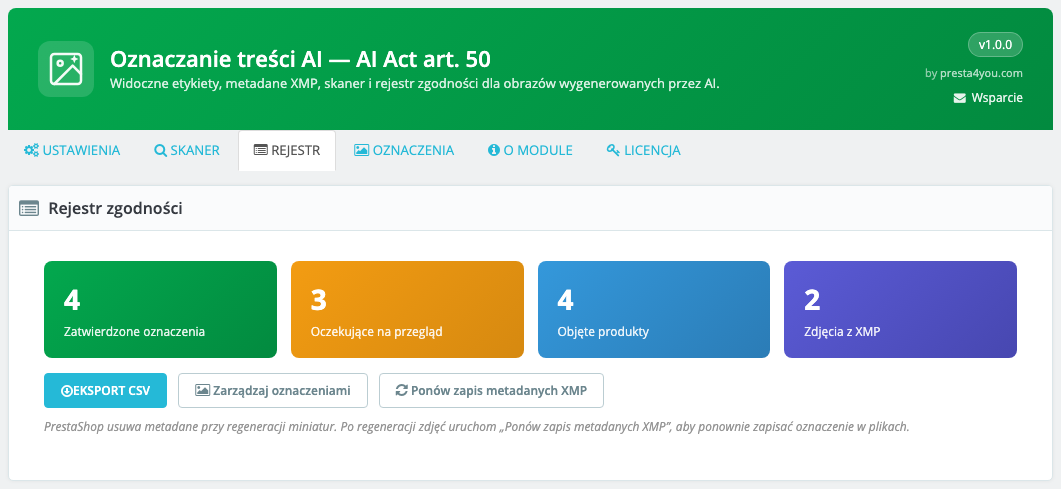
Compliance registry. Statistic tiles (confirmed, pending, covered products, images with XMP), CSV export, and re-applying XMP metadata after thumbnail regeneration.
Scanner
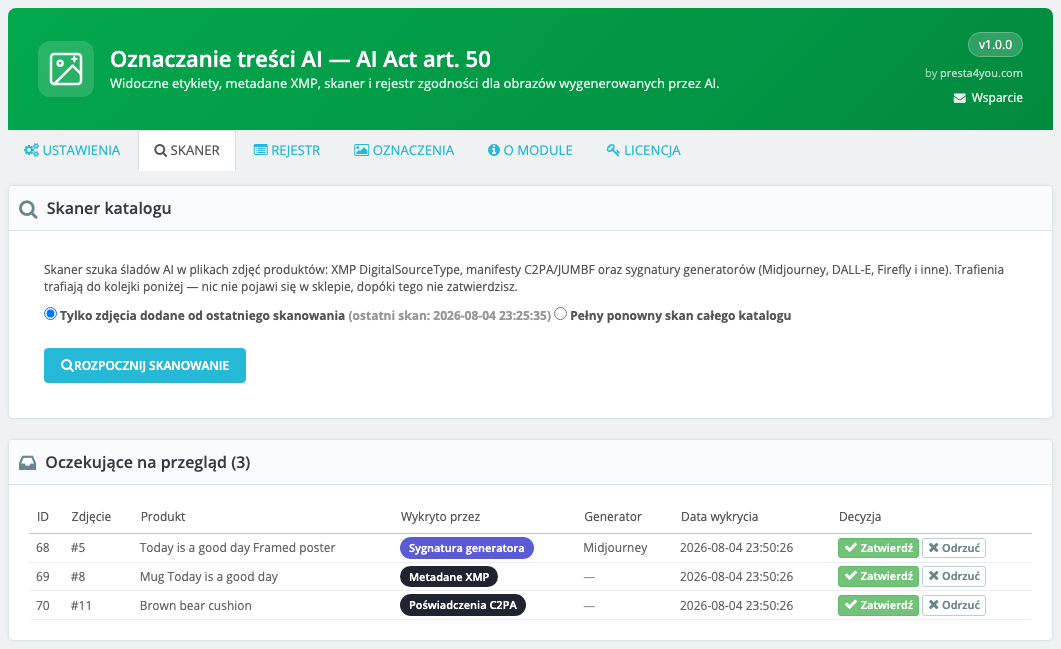
Catalog scanner. Choose the scope (new images since the last scan or a full rescan) and run the background scan. Hits land in the Pending review queue with a Detected by column stating exactly what triggered the flag: XMP metadata, C2PA credentials or a generator signature. Only a signature reveals the tool name, which is why the Generator column is often empty.
FAQ
Q: Do I have to mark every AI-generated image?
Article 50 of the AI Act requires marking photorealistic images that could pass as real (deepfakes). Purely illustrative graphics generally do not need marking. The decision is always yours — the module never marks anything without confirmation.
Q: Does the scanner mark images in the store by itself?
No. Scanner hits go to the review queue with pending status and are not visible in the store until you confirm them.
Q: Why did the scanner flag an image while the Generator column is empty?
Only a generator signature in the file metadata reveals the tool name (Midjourney, DALL-E, Firefly…). Hits based on the XMP DigitalSourceType marker or on C2PA credentials only tell you the file declares AI origin — not which tool produced it. The Detected by column always shows which of the three methods fired.
Q: Can I change the label colours?
Yes. Pick a preset (dark, light, accent), set your own background and text colours, or choose "theme styles" — then the module imposes no colours at all and the label looks exactly like the theme's native New/Sale flags.
Q: What happens when I remove a mark?
The row disappears from the registry, the label disappears from the storefront, and the IPTC/XMP marker is stripped from the image file and all of its thumbnails. The photo no longer declares AI origin outside your store, and it will not return to the review queue on the next scan.
Q: What happens to XMP metadata after thumbnail regeneration?
PrestaShop strips metadata when regenerating thumbnails. The Registry tab has a Re-apply XMP metadata button that writes the marking back into all files.
Q: Does the module modify my theme?
No. List labels use native product flags and the gallery badge is added by a JS script — no theme file modifications.
Q: Do marks work in multistore?
Yes, marks can be global or per shop (id_shop column), and the configuration is multistore-aware.
Changelog
## [1.0.1] - 2026-08-09
### Fixed
- Marking did not work on a fresh install: the installer created the table without the
`evidence` column that every save already used. New installs get the column, existing
ones via the upgrade-1.0.1 script.
### Changed
- The registry CSV export now includes the `evidence` (detection basis) and `id_shop` columns.
## [1.0.0] - 2026-08-04
### Added
- Initial release — AI content marking per EU AI Act art. 50
- Label on product lists and overlay badge on the image gallery
- Disclosure line on the product page
- IPTC/XMP DigitalSourceType metadata in JPEG files and schema.org JSON-LD
- Catalog scanner with a review queue (XMP, C2PA, generator signatures)
- Compliance registry with statistics and CSV export
Support
Need help? Contact us!
| info@presta4you.com | |
| WWW | https://presta4you.com |
| Online documentation | presta4you.com/en/content/39-ai-content-marking-eu-ai-act-art-50-documentation |
Everything described in this documentation is handled by the AI Content Marking — EU AI Act art. 50 module. Installation takes a few minutes and the configuration works exactly as described above.
View the module in the storeUpdates and technical support · VAT invoice