 English
 Polish
 Français

We know about failures
before your customers do
An agent installed in your store sees what cannot be seen from the outside. Every four hours an AI analysis looks for changes that precede a failure. Every signal is checked by a human, who also quotes the fix — 399 PLN net per month.
- Availability checked every 5 minutes, around the clock
- Agent in the store: performance, database, modules, file integrity
- AI analysis every 4 hours — including what no rule anticipated
- Every report is verified by a human, not a machine
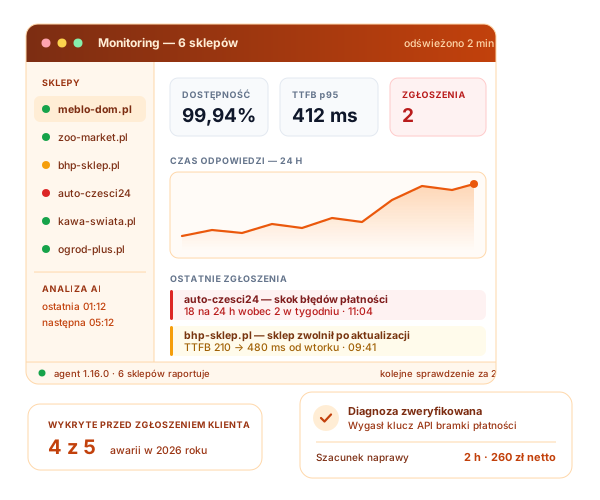
Ordinary monitoring only asks whether the page opens
That is not enough. A store can answer with a 200 code and at the same time refuse payments, lose orders or slowly choke on its own database. Our monitoring looks at the store from the inside and compares it with itself a week earlier.
What exactly we check
Six areas, from outside and inside the store. All for one price.
Availability and response time
We check the store every 5 minutes from the outside. We measure more than up or down — we measure where the time goes.
- Response code and load time
- Breakdown into DNS, connection, TLS and page generation
- Content check — whether the page actually rendered
- Availability report for every month
Agent in the store
A module installed in your store reports a state that no external monitoring can see.
- Page generation time: median and peaks
- PrestaShop, PHP and MySQL versions
- Cache and OPcache state
- Slow queries and missing indexes
AI analysis every 4 hours
Rules catch what somebody anticipated in advance. The AI analysis looks for the rest: slow drifts and unusual coincidences.
- Comparison with the last week and the last month
- Linking a drop in performance to a change in the store
- A diagnosis with a list of things to check
- Only technical data is sent for analysis
Security and certificates
We keep an eye on deadlines and changes that are easy to forget until they turn into a failure.
- SSL certificate and domain expiry
- Changes in DNS and in SPF, DKIM and DMARC mail records
- Whether the store appears on warning lists
- File integrity checks and known vulnerabilities of your version
Sales signals
The most expensive failures do not take the store down — they quietly switch selling off. We catch those in the data.
- A sudden drop in the number of orders
- A spike in payment errors
- A spike in abandoned carts
- A flood of 404 errors after catalogue changes
A human at the end of the chain
No machine ever writes to you directly. A developer looks at the signal first.
- Verification of the report in your store
- An explanation of what is happening and what it means for sales
- A quote for the fix before any work starts
- A monthly report on the state of the store
This is what it looks like in practice
Below are real screenshots from our panel — with real warnings, not from an idealised demo store. Shop names and addresses are hidden.

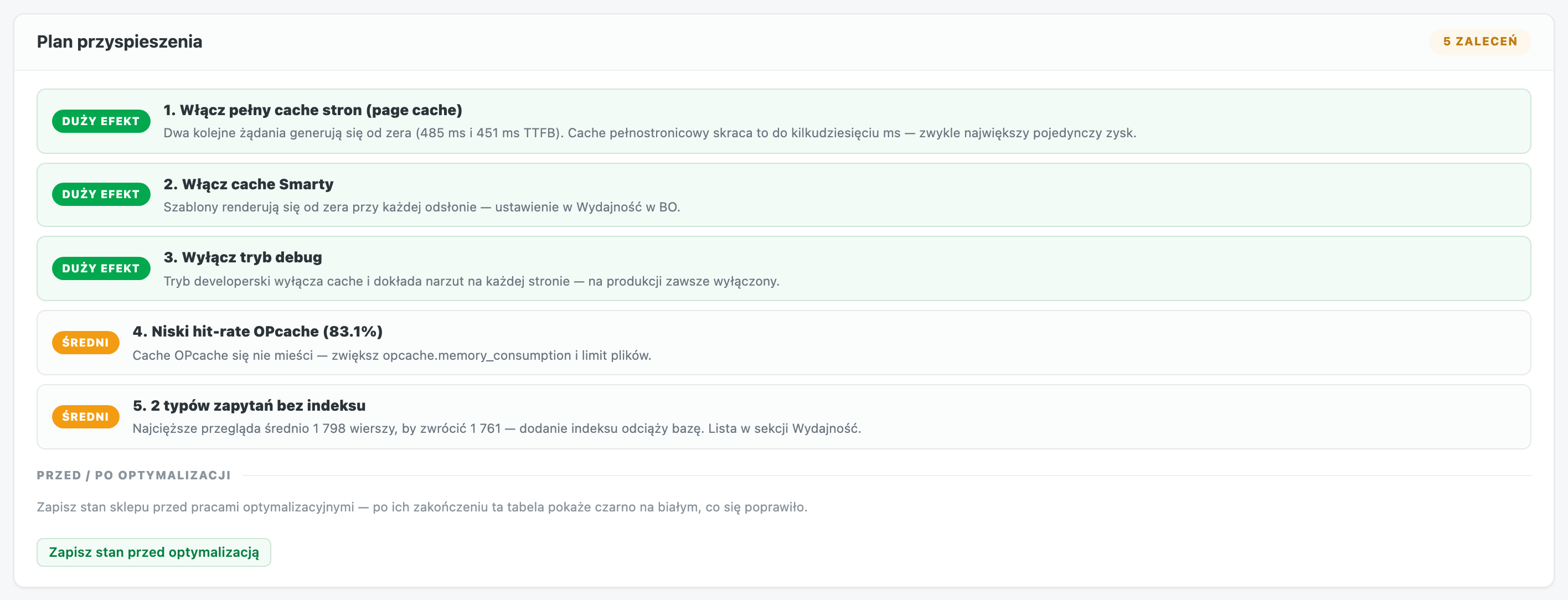
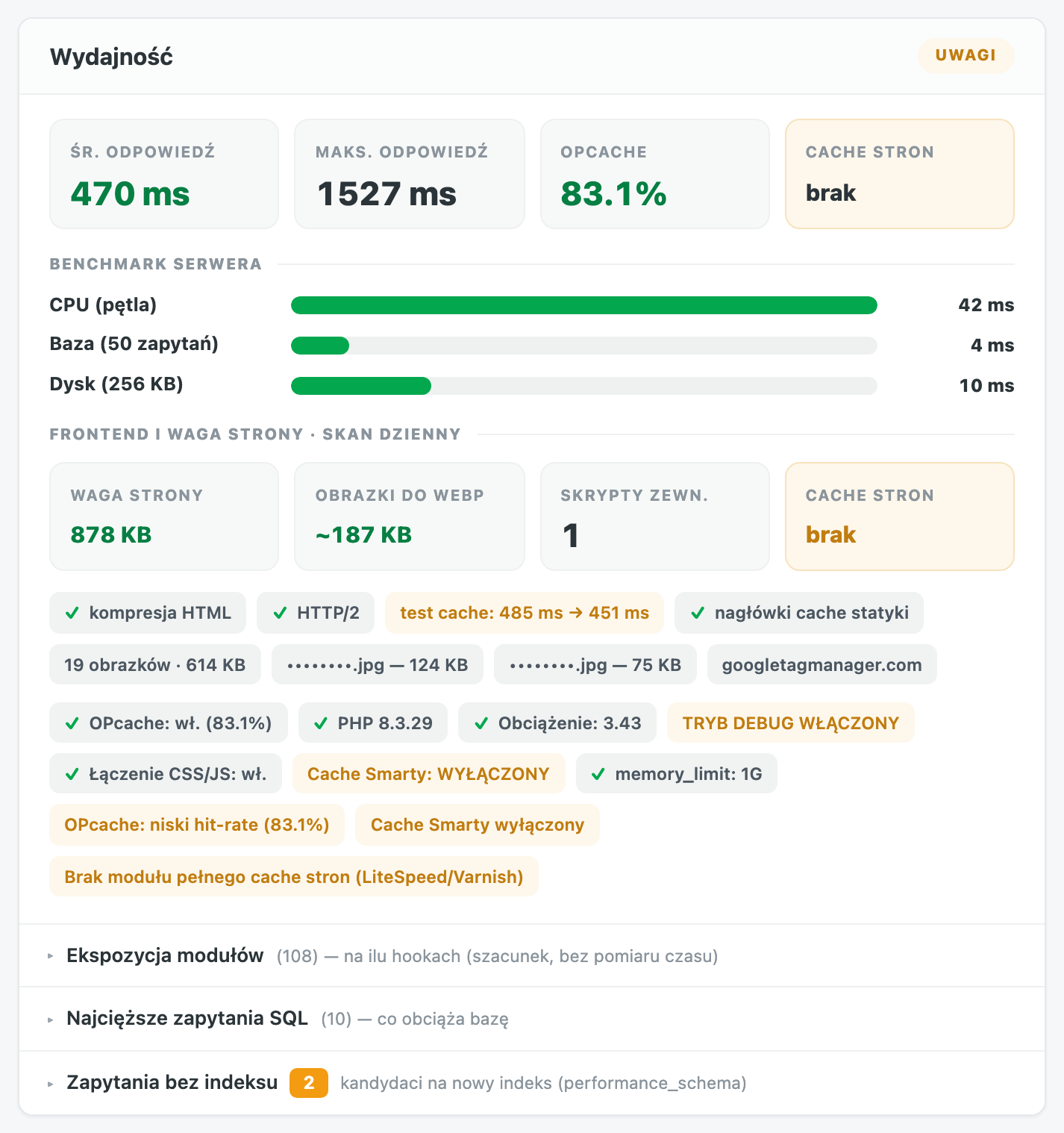
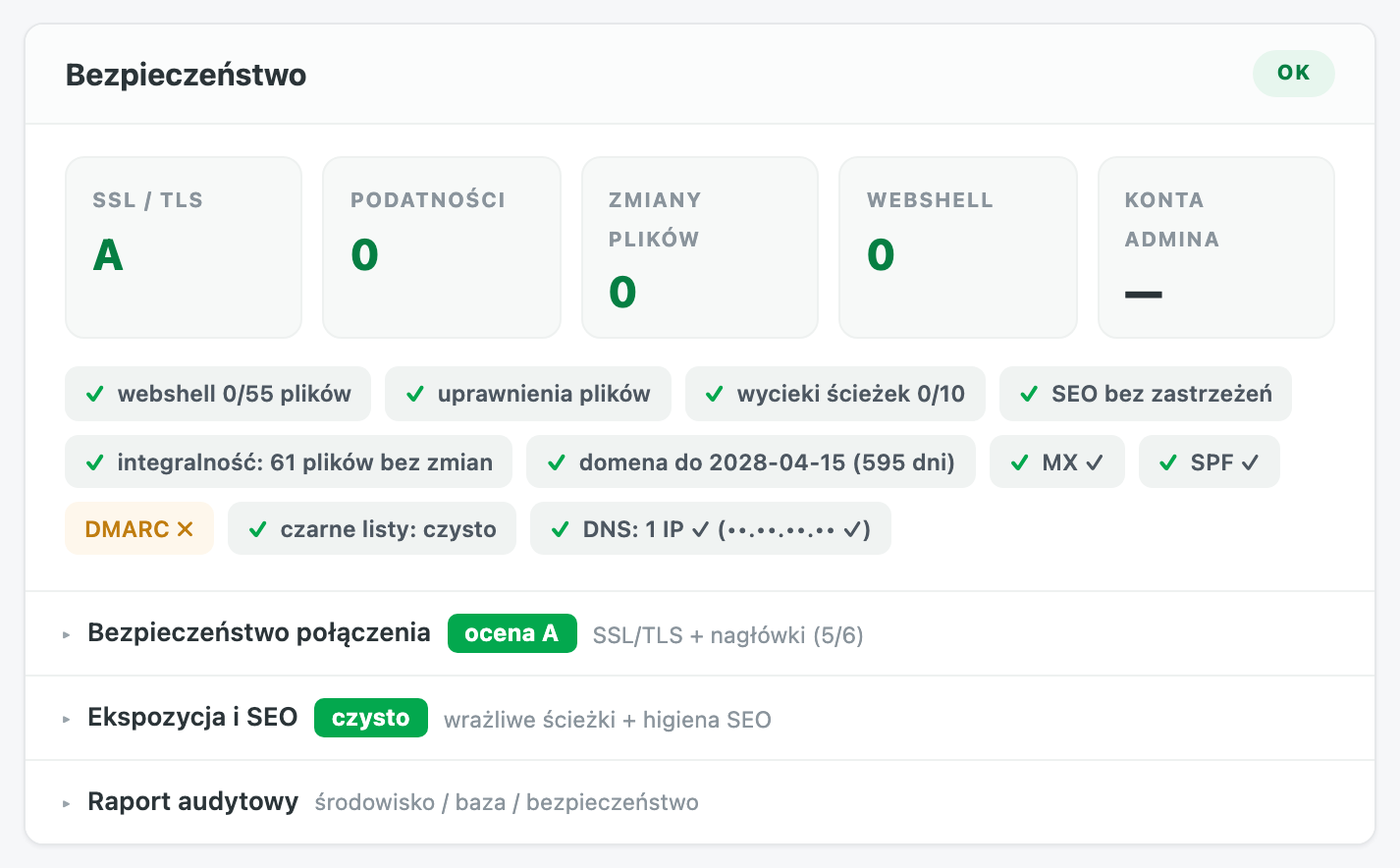
These are screenshots of a real store under our care. Identifiers — names, addresses, files and IP addresses — have been hidden, because we do not show that data to anyone.
One price, no tiers
You get everything above as a whole, regardless of the size of your store.
Monitoring and supervision
For stores that simply have to work — without buying developer hours
- Availability checked every 5 minutes, around the clock
- Agent in the store: performance, database, modules, files
- AI analysis every 4 hours
- Supervision of SSL, domain, DNS and mail
- Sales signals: orders, payments, carts
- Every report verified by a developer
- A quote for the fix before any work starts
- A monthly report on the state of the store
- A panel with the store state and the history of reports
How we set it up
From your enquiry to the first report usually takes one working day.
Request
You give us the store address. We start checking from the outside the same day — we do not need access to the store.
Agent in the store
We install the agent module. It changes nothing in the store — it only reads the state and reports it to our server.
Baseline
For the first week we collect data to learn what is normal for your store. Without that, every alarm would be guesswork.
Supervision
From then on we watch the store, and you hear from us only when there is genuinely something to say.
Frequently asked questions
What customers ask before they decide.
How is this different from free uptime monitoring?
Free tools ask whether the page opens and send an e-mail when it stops. We look at the store from the inside: performance, database, modules, file integrity and sales signals. The most expensive failures do not take the store down — the store answers correctly and quietly stops accepting payments. Free uptime will not see that.
Is my data and my customers' data sent to the AI?
No. Only technical telemetry is sent: software versions, response times, counters, module and table names. Personal data, order contents and error messages containing buyers' data never leave our server — that is enforced by an allow-list of fields in the code, not by a clause in the terms.
Will the agent slow my store down?
No. The agent collects data once per reporting interval, on a single request — never on customer traffic. Heavier measurements are optional and sampled. The agent itself is one of the things we monitor, so if it started to weigh on the store, we would be the first to see it.
Do you fix what you find?
Monitoring covers detection, verification and a quote — the repair itself is billed separately at 150 PLN net per hour and always after your approval. If failures happen regularly, a care plan with hours works out cheaper: monitoring then costs 299 PLN (199 PLN in the Premium plan from 30 hours) and an hour 130 PLN.
Will I be flooded with alarms about nothing?
No, and that is built into how the system works. The same problem is reported once, not every four hours. A report without concrete supporting data is rejected automatically. And a human still checks the signal before writing to you.
Which PrestaShop versions does this work with?
From 1.7, through 8.x, to the latest 9.x. Checks from the outside work on any store, whatever its version or technology — we install the agent wherever that is possible.
Do I have to give you access to the store admin?
For monitoring alone, the store address and a one-off agent installation are enough. Access to the admin is only needed for a fix — and only once you have approved the quote.
Related services
Monitoring is the starting point. If your store needs continuous work, look further.